A platform upgrade starts with a reasonable wish list: a smoother checkout, fewer plugins to babysit, an easier way to manage products.
THEN the details get interesting. A category needs a new address. Product variants behave differently. The redirect import skips a few rows.
Each change deserves a closer look, especially on pages that already attract buyers. That’s the work behind ecommerce platform migration SEO: preserving and validating the search signals affected by a change of ecommerce platform. It connects old pages with suitable destinations and checks that useful content, internal links, and product information survive the move. Importing the catalog is one part of that job.
For your agency, the useful question becomes: what needs to stay consistent while the technology changes underneath it?
Let’s unpack the platform quirks, mapping decisions, and launch checks that help you answer it – and show where specialist review can catch a small mismatch before it becomes a much larger problem to untangle.
What Search Value Does Your New Store Need to Preserve?
Your product database tells you what the store sells. It takes a little detective work to find everything helping people discover it. Before the rebuild begins, we need a record of those pages and what they contribute.
Target the Pages That Bring Buyers In
A category might attract shoppers who haven’t settled on a product. A buying guide could answer the question that starts their purchase. Product images and pages with useful backlinks deserve a place in the inventory, too.
These relationships help explain how ecommerce SEO differs from regular SEO.
Before an ecommerce site migration, we combine a crawl with Search Console, analytics, XML sitemaps, and available server logs. A crawl follows discoverable links; other records can reveal URLs it never reaches. Prioritize pages contributing orders, qualified visits, or valuable links, while keeping quieter and seasonal pages accounted for.
Record What Those Pages Need to Retain
Save a baseline you can compare with the rebuilt store:
- Commercial performance: organic landing-page visits and attributable orders or revenue.
- Search visibility: queries, clicks, impressions, and priority rankings.
- Page content: titles, headings, useful copy, images, and product details.
- Technical access: internal links, crawl depth, indexability, and canonical URLs.
Our ecommerce SEO services in the USA bring these checks into the migration plan.
Also Record What’s Changing.
Keeping the domain doesn’t guarantee unchanged URLs. Adding a redesign, rewritten content, or new markets expands what needs validation. Google’s site-move guidance recommends separating major changes where possible, making problems easier to trace.
That documented baseline gives everyone something concrete to preserve before replacement URLs are approved.
Every Old Page Needs a Deliberate Destination
A redirect can work perfectly and still send someone to the wrong place. Before adding rules to your SEO site migration checklist, decide what each old page should become and whether its replacement answers the same customer need.
Preserve, Replace, Consolidate, or Retire
Every meaningful URL needs a decision:
- Preserve: keep the existing address where the new platform allows it.
- Replace: redirect a changed URL to its relevant new counterpart.
- Consolidate: combine pages only when the destination genuinely covers their content and purpose.
- Retire: return an appropriate 404 or 410 response when content is permanently removed without a suitable replacement.
A permanent redirect, typically a 301 or 308, tells browsers and search engines that a page has moved. Point it directly to the final destination. Routing visitors through several old addresses creates a redirect chain, adding delay and complicating troubleshooting.
Google also cautions against sending unrelated pages to the homepage; those redirects may be treated as soft 404s.
Illustrative mapping decisions.
| Old page | Planned destination | What needs checking |
| Product with a changed URL | Same product’s new page | Correct item; working page |
| Two overlapping categories | Combined category | Both shopping needs covered |
| Retired product without a replacement | No redirect | Appropriate status; internal links updated |
AI Can Suggest a Match. But Someone Must Verify It.
An automated tool might pair ‘leather cleaner’ with ‘leather conditioner’. Similar names, different jobs, and a shopper expecting one won’t necessarily want the other.
Automation can speed up classification and suggest destinations. We review relevance and exceptions, then test status codes, redirect paths, and destination pages. A filled spreadsheet records the plan; tested results show whether it works.
Four Platform Moves, Different Things to Check
The migration plan gets more specific once you know what’s running the old store and what will power its replacement. Each platform handles URLs, content, and redirects differently. We check those differences against the store you actually have.
Moving to Shopify
Shopify uses defined paths such as /products/ and /collections/, so existing addresses may need replacements.
Our Shopify SEO services check the mapping against the resulting storefront:
Redirect eligibility: Under Shopify’s redirect requirements, native redirects work from broken URLs; an active page can prevent a rule from working.
Legacy addresses: Test URLs containing query parameters and confirm they reach the intended products or collections.
An import report can confirm that data moved. Those checks establish whether customers can still reach it.
Moving to or From WooCommerce
WooCommerce’s product and category permalinks sit alongside WordPress settings.
Our work as a WooCommerce SEO company in the USA accounts for both:
URL configuration: Record product and category bases, custom structures, and existing redirects.
WordPress dependencies: Identify content, metadata, and navigation supplied by themes or extensions that need recreating.
We also check the guides and internal links helping your client’s WooCommerce stores grow with WordPress SEO, so those connections carry into the new store alongside the products. They belong in the migration scope alongside products.
Moving to or From Magento
Magento and Adobe Commerce stores can carry extensive URL rewrite histories.
Our Magento SEO services examine how those rules interact:
Existing entry points: Compare rewrite records with crawl findings to capture older addresses.
Preferred destinations: Review category paths and canonical settings before selecting replacement product URLs.
Today’s navigation won’t necessarily reveal every address customers and search engines still use.
Moving to or From BigCommerce
Our BigCommerce SEO services review redirect behavior against the relevant storefront, particularly in configurations with multiple storefronts:
Redirect coverage: Test old addresses on the correct domain and storefront.
Destination relevance: Confirm category and product replacements match that storefront’s catalog.
A working redirect still needs to land in the right shopping context.
At eSEO Agency, we connect the source store’s behavior with the destination platform’s requirements, giving your developer specific changes to implement and our team concrete results to validate.
A Finished Store Still Needs Launch Approval
The storefront looks ready. Now we need evidence that its templates, redirects, and shopping journeys behave as expected. This stage of ecommerce platform migration SEO gives your agency a documented basis for approving the move, and a clear list of anything still needing attention.
Test the Templates, Then Their Exceptions
We test representative products and categories, then examine variants, paginated listings, filtered pages, and relevant language or market versions. One working product page doesn’t prove every template and configuration is ready.
Our checks cover:
- Search access: Intended landing pages are crawlable and eligible for indexing once launch restrictions are removed.
- Consistent URLs: Canonicals, internal links, and sitemap entries point to the intended destinations, following Google’s ecommerce URL guidance.
- Content and navigation: Useful copy, images, and links remain accessible, including on mobile.
- Product information: Markup reflects visible prices, availability, and genuine reviews, checked against Google’s product structured-data guidance.
- Shopping and measurement: Browsing, checkout, and purchase tracking work through a tested customer journey.
Filters deserve individual decisions. A useful filtered landing page may serve an established search need; endless combinations of size, color, and sorting options can create unnecessary crawl paths.
We check which pages should remain discoverable before applying broad rules.
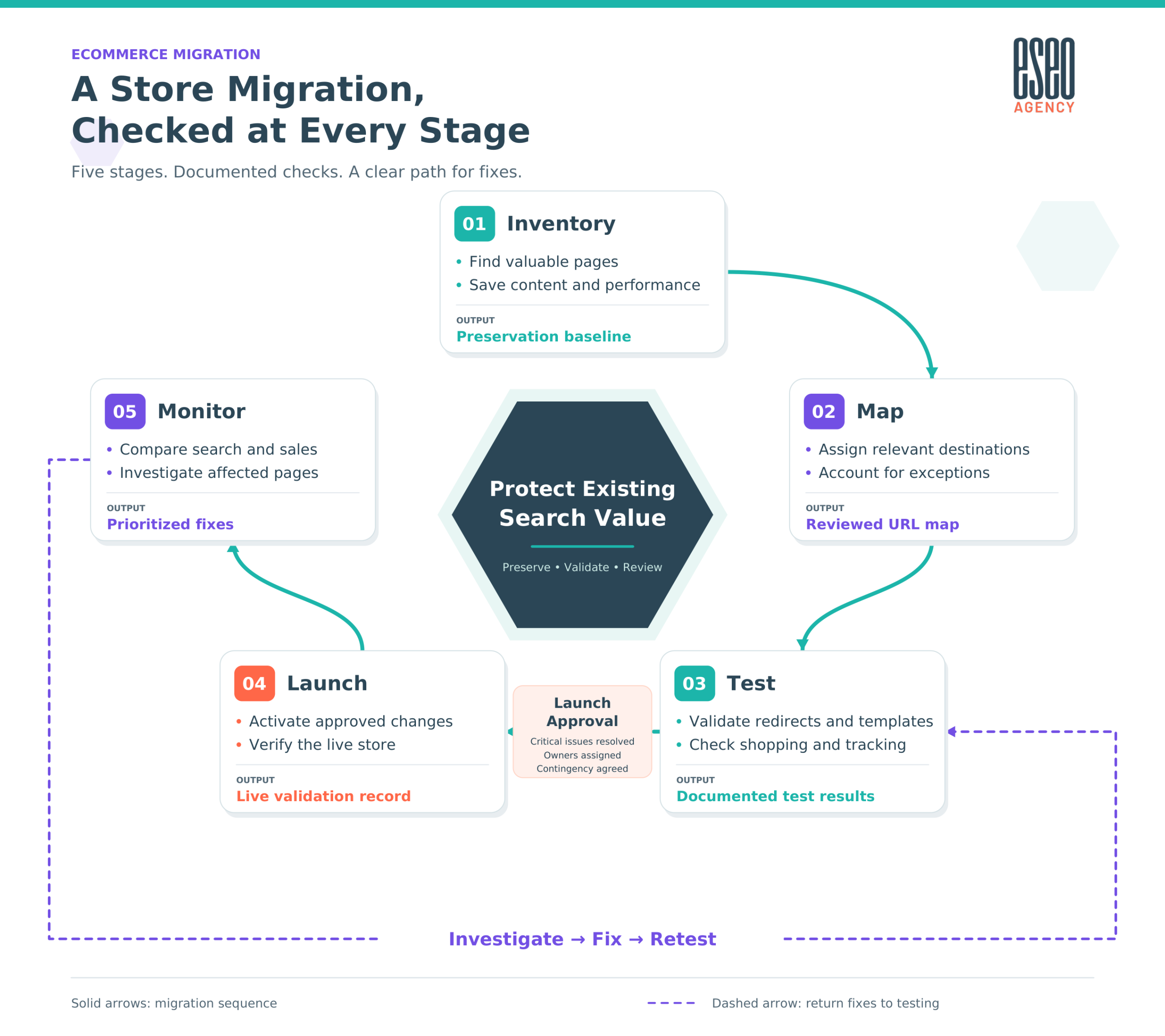
Ecommerce migration workflow showing Inventory, Map, Test, Launch, and Monitor, with a launch approval checkpoint and a feedback path returning fixes to testing.
Agree Who Can Approve the Move
Assign named owners for SEO validation, development fixes, commerce testing, and the final launch decision. Record unresolved issues, their impact, and what must be fixed before approval.
Agree on launch timing, backups, support availability, and a contingency plan that accounts for new orders and inventory changes. Restoring an earlier version may require careful data reconciliation.
We then repeat critical checks on the live store, where staging results need confirmation against the production setup.
Read More: SEO techniques for better website visibility
Read the First Reports Before Making More Changes
The first reports can make every dip look migration-related. We compare them with the saved baseline before recommending another round of changes. The useful question is which pages, channels, or shopping steps changed and what evidence helps explain why.
What Changed, and What Should You Check?
| What you notice | Where we start investigating |
| Search clicks decline | Affected destinations, redirects, indexing, and query performance |
| Recorded purchases fall, but actual orders stay steady | Purchase events, consent settings, and analytics configuration |
| Visits stay steady, but orders fall | Checkout, mobile usability, pricing, shipping, and stock |
| One category loses visibility | Its mapping, content, navigation, and product availability |
These are starting points, not automatic diagnoses. We compare priority pages alongside storewide totals and account for seasonality, promotions, stock changes, and other releases. A quieter trading week needs context; a valuable category redirecting incorrectly needs a fix.
Our post-launch checks also include Merchant Center landing pages: product links should reach the correct live items with matching price and availability information.
Keep permanent redirects in place for at least a year, ideally longer where useful. If the project changes an eligible domain or subdomain, use Search Console’s Change of Address tool. A platform switch retaining the same domain doesn’t require it.
Migration stabilization also deserves its own expectations. Discussing how long SEO takes to show results concerns building performance; checking whether existing search value survived starts immediately after launch.
We investigate the pattern, fix confirmed issues, and retest before introducing more variables.
Also Read: How long it takes SEO to start working
Bring Us In Before the Launch Date Is Fixed
A launch date is easier to commit to once you know what needs protecting and who’s doing the work. Bring us into your ecommerce site migration while those decisions are still open, so SEO requirements can inform the build.
For an initial discussion, share:
- The starting point: your current store and proposed platform.
- Planned changes: URLs, catalog structure, markets, or domain.
- Available evidence: Search Console, analytics, and previous audits.
- Project responsibilities: who’s developing the store and your intended launch window.
You don’t need every answer ready. We can identify missing information and agree on what needs investigation before the scope is finalized.
Together, we’ll define the risk review, preservation requirements, mapping validation, launch checks, and post-launch monitoring your project needs. Your developer should leave with actionable requirements, and your agency should understand what we’ll review, what needs implementation, and how approval will work.
As you evaluate a Top SEO co mpany in the USA, ask for that level of detail. A useful proposal should make responsibilities, deliverables, and unresolved dependencies clear enough to plan around before you commit your client to a date.
Give Your Client a Launch You Can Stand Behind
Approving a store move feels different when you can explain what’s been preserved, what’s been tested, and who’s handling the remaining work. Bringing ecommerce platform migration SEO into the project early gives those requirements room in the build, before the structure and deadline become expensive to revisit.
Let’s discuss your current store, destination platform, and planned launch window over a consultation. We’ll talk through the finer details, identify the information needed, and scope the support around your developer’s responsibilities.
If you’re ready to get a migration SEO audit, contact eSEO Agency to discuss a suitable quote.
Share what’s already planned and what’s still undecided, so we can define the review, deliverables, and next steps your agency needs to move forward with a clearer picture.
Frequently Asked Questions
What Is a Migration SEO Audit?
It’s a review of the search risks a planned move introduces, identifying what needs preserving, correcting, and testing before launch.
What Is URL Mapping?
URL mapping records what should happen to each old address: stay unchanged, redirect to a relevant destination, or retire without a replacement.
What Is a Canonical URL?
It’s the preferred address for a page. A canonical tag signals that preference to search engines when similar content appears at multiple URLs.
Can You Work Alongside Our Existing Developer?
Yes. We define SEO requirements and validate results, while your developer handles agreed implementation tasks. We establish responsibilities before work begins.
Can We Involve You After the New Store Is Already Built?
Yes. We can review the build, identify gaps, and prioritize corrections. Some findings may require development changes before the store is ready.
What Access Would You Need to Assess the Project?
We’ll identify the relevant store, staging, Search Console, and analytics access. Permissions should match the review; administrator access isn’t automatically necessary.
What Determines the Cost of Migration SEO Support?
Catalog complexity, URL changes, markets, integrations, and the required support affect scope. We also consider existing documentation and how much validation remains.
Can We Keep Taking Orders While the New Store Is Prepared?
Often, yes. The live store can continue operating during preparation, with a coordinated final sync for orders, inventory, and other changing data.
Can You Review Redirect Mappings Produced by AI or a Migration App?
Yes. We review destination relevance and exceptions, then test redirect behavior. Automated matches still need checking against the actual products and pages.
Does Moving Our Blog Content Matter for AI Search Visibility?
Useful, accessible resources can support visibility in AI search results. We check their content, links, and destinations, although preserving them can’t guarantee AI citations.
What If Competitors Overtake Us Around the Launch?
We investigate migration issues alongside market changes. An SEO competitor analysis helps assess whether competitors improved while we check your affected pages.